C++ Here
Next-generation
online C++ compiler.
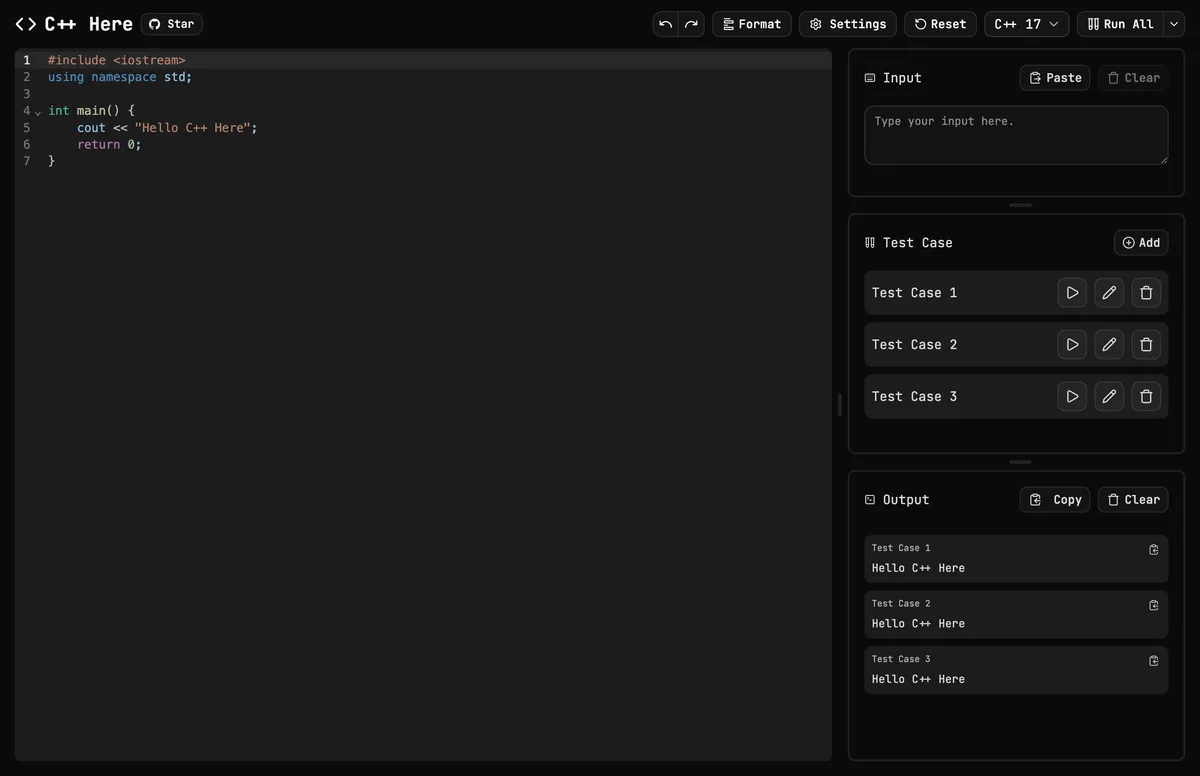
An open-source, lightweight yet powerful online C++ compiler built for competitive programming
// features
Everything you need.
Nothing you don't.
A focused toolkit that turns the browser into a powerful C++ workspace.
C++ to WebAssembly
Compiles C++ code into WebAssembly and executes them directly in the browser — fast, no resource limitations.
Error Highlighting
Compiler errors are parsed and pinned to the exact line they occur — clear, actionable diagnostics without the noise.
Built-in Test Cases
Define, run, and compare multiple test cases side-by-side. Designed for the way competitive programmers actually work.
Code Formatting
Clang-format integrated. One shortcut to keep your style consistent — with support for multiple code style presets.
i18n Ready
First-class support for English and Traditional Chinese, with more languages on the way. You can help translate on Crowdin!
Smart Autocomplete
Context-aware suggestions for STL containers and algorithms — write C++ faster without leaving the flow.
Any Screen, Any Device
The interface adapts seamlessly to any screen size. Works on any screen, any device. Code comfortably wherever you are.
Secured by Design
Cloudflare Turnstile blocks bots. Every compilation runs in an isolated, single-use Docker container — secure by default.
Share in One Click
Share your code, test cases, input, and results with a single link — instantly, no setup required.
Open-source & free
Audit it, fork it, ship it. MIT licensed.
// extensions
One click.
All your test cases.
Skip the copy-paste
Import test cases directly from your browser with our extension. Support over 100 competitive programming platforms.
// stats
Real numbers.
Real usage.
4.7K+
Compilations
168.7K+
Lines Compiled
540.2 MB+
Wasm Compiled
2.1 hrs+
Total Time Compiled
// faq
Got questions?
We've got answers.
Yes. C++ Here is completely free, with no ads, no paid plans, and no feature limits. The full source code is on GitHub under the MIT license.
No. There is nothing to download and no sign-up or login. Open the editor in any modern browser and start writing C++ right away.
You can pick C++98, C++14, C++17, C++20, or C++23 from the version menu in the editor. C++17 is the default.
Yes. bits/stdc++.h works even though Clang doesn't normally ship it. It is precompiled for every C++ version, so programs that start with #include <bits/stdc++.h> compile 2 to 3 times faster.
Type the input into a test case. cin, scanf, getline, and other standard input functions read from it exactly as they would read from stdin on an online judge. You can add as many test cases as you like and run them all at once.
Yes, it was built for it. Multiple test cases, a configurable time limit, bits/stdc++.h support, and one-shortcut formatting match how you work on Codeforces, AtCoder, CSES, and other online judges, without setting up a local IDE.
Each run has a 10-second time limit by default, which you can change or turn off in Settings. Programs can use up to 512 MB of memory with an 8 MB stack, and up to 32 MB of output. Compilation itself times out after 30 seconds.
Yes. The editor adapts to any screen size, so you can write and run C++ on an iPhone, iPad, Android phone, Chromebook, or any device with a modern browser.
Yes. Your code, test cases, and settings are saved automatically in your browser's local storage, so they are still there when you come back. They stay on that device and browser only, so back up anything important.
Yes. Click Share to get a link that contains your code, test cases, input, and output. Anyone who opens the link sees exactly what you saw, which is handy for asking for help or explaining a solution.
Open the editor, write or paste your code, type your input into a test case, and press Ctrl + Enter (⌘ + Enter on macOS). Your code is compiled to WebAssembly and the output appears next to the test case within seconds.
A browser extension that imports sample test cases from over 100 competitive programming sites, including Codeforces, AtCoder, and CSES, with one click is coming soon.
Most online compilers run your program on a shared server and make you wait in a queue. C++ Here only compiles on the server, then runs the WebAssembly program on your own device, so execution speed isn't limited by server load. Recent builds are cached, so running the same code again skips compilation.
Yes. Compilation happens in an isolated, single-use Docker container with no network access, and your program then runs inside the browser's WebAssembly sandbox, which cannot touch your files or system. Cloudflare Turnstile keeps bots out.
Press Shift + Alt + F (Shift + Option + F on macOS) to format your code with clang-format. You can choose the LLVM, Google, Chromium, Mozilla, WebKit, Microsoft, or GNU style and set the indent width in Settings.
C++ Here compiles your code with Emscripten, which is based on Clang and LLVM and uses the libc++ standard library. The result is a WebAssembly program that runs in your browser.
C++ Here is available in English and Traditional Chinese, with more languages on the way. Anyone can help translate it on Crowdin.
C++ Here is a free, open-source online C++ compiler and editor built for competitive programming. You write C++ in your browser, compile it to WebAssembly, and run it against your own test cases, with error highlighting, code formatting, and autocomplete built in.